SACRIFICIAL GEOMETRY: HOW 44 CAM SYSTEM MACROS CARVE ANY FANCY OUTLINE
A quick note: I’m not a trained gemologist. No GIA diploma, no mineralogy degree, and no traditional bench apprenticeship. Just a software engineer who fell down the rabbit hole of faceting machines, geometry, and how light bounces around inside crystals.
Open almost any non-round gemstone program in the ProFacet or OffTheDop catalog and look at the very first instruction after the material and gear settings. Before a single pavilion main or crown bezel is cut, you will see a one-line function call such as RectTr, Oval, Pear, or PentCushTr.
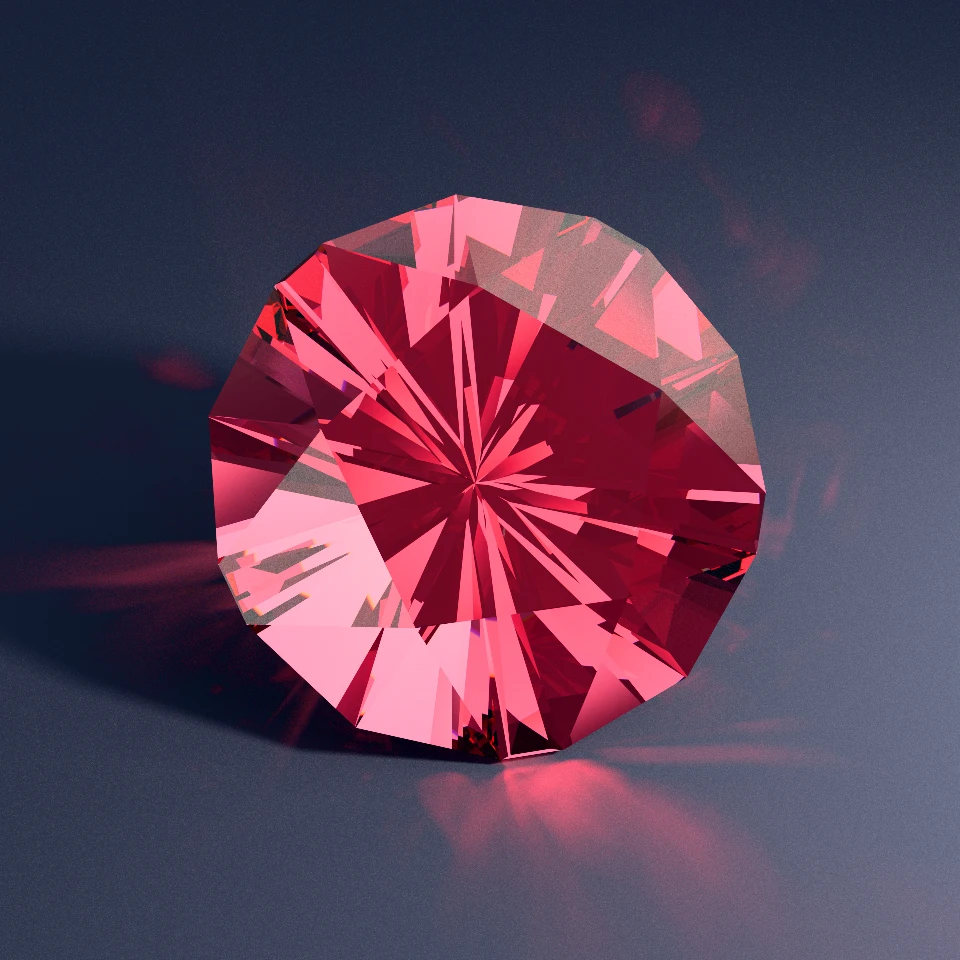
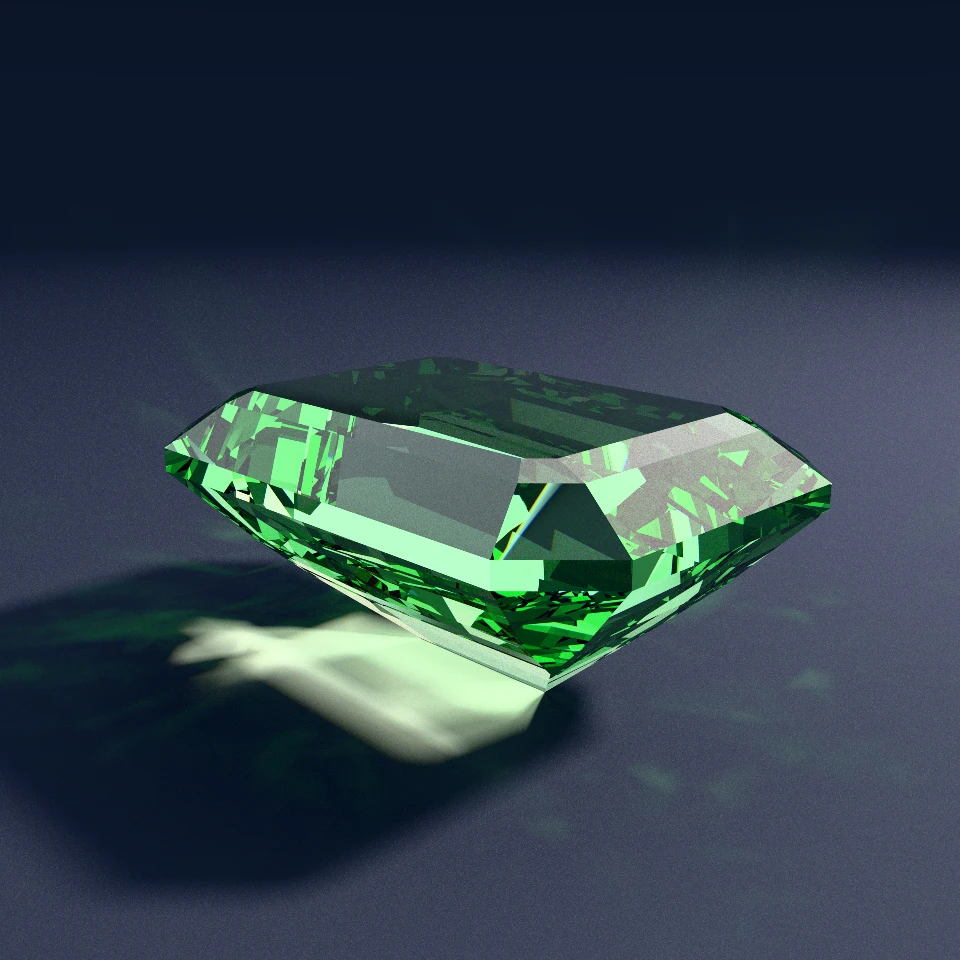
PentCushTr system macro call at the top of the file.Here is the complete plain-text FSL source for Glacial Whisper 286, rendered above:
name = "Glacial Whisper 286"
ri   = 1.72
gear = 120

// One-line CAM system macro locks in the 5-fold cushioned pentagonal girdle
PentCushTr(offset = 5, angle = 16.96, truncation = 0.19)

// Pavilion
P1 0  @ 45.06 : cp() x10
P2 5  @ 46.38 : gp() xx5
P3 12 @ 56.55 : gp() x5
P4 8  @ 45.36 : gp() xx5
P5 10         : mp(P2) : mp(P3) x5

// Crown & Table
C1 12 @ 22.44 : gp() + girdle
C2 5  @ 28.69 : gp() xx5
T  0  @ 0.00  : mp(C2) x1

assert(stone().isGirdleOK)
If you have never cut a fancy-shaped stone on a physical mast machine, that opening PentCushTr call can look like mysterious CAD boilerplate. In reality, it is one of the oldest and cleverest geometric tricks in precision lapidary, packaged into a reusable standard library. Let's start with a plain-English look at what a CAM model is and why it is there.
What A Cam Model Is, And Why It Is There
In FSL, a CAM model (or system macro) is a built-in, one-line preform function that cuts a temporary, sacrificial cone of angled facets meeting at a single temporary centerpoint (cp()), and immediately cuts vertical 90° girdle facets directly to the ridges of that cone. ProFacet ships 44 built-in CAM system macros covering regular polygons, emerald octagons, cushions, curved trilliants, shields, ovals, marquises, pears, lozenges, and asymmetric kites.
Cutting a dead-level 90° girdle on a round stone is effortless because every girdle facet sits at the exact same radial distance from the dop axis. Set one mast stop, click around the index wheel, and your round outline is finished.
The moment you leave a circle behind, that equal-radius shortcut vanishes. On an emerald rectangle, an oval, a pear, or a cushioned pentagon, every 90° girdle tier sits at a different radial distance from the center of the dop. Without a geometric guide, establishing a non-round girdle forces you into two bad choices:
- At the physical bench: Grinding vertical 90° walls by eyeball and vernier calipers, hoping eight or twenty-four separate girdle facets somehow land at the exact widths needed for the real pavilion tiers to meet evenly later.
- In digital CAD and optimization: Storing raw decimal plane distances, which cannot be cut accurately on a standard mast machine and break the level girdle the instant you adjust a length-to-width ratio or mast angle.
Traditional human meetpoint cutters solved this decades ago on purely mechanical machines with the Centerpoint-Angle Method (CAM). Bench pioneers worked it out long before GPUs existed: tilt a temporary cone so that unequal horizontal widths become crisp 10x-loupe meetpoints, lock the 90° girdle to those corners, and then grind the temporary cone completely away when you cut the real pavilion.
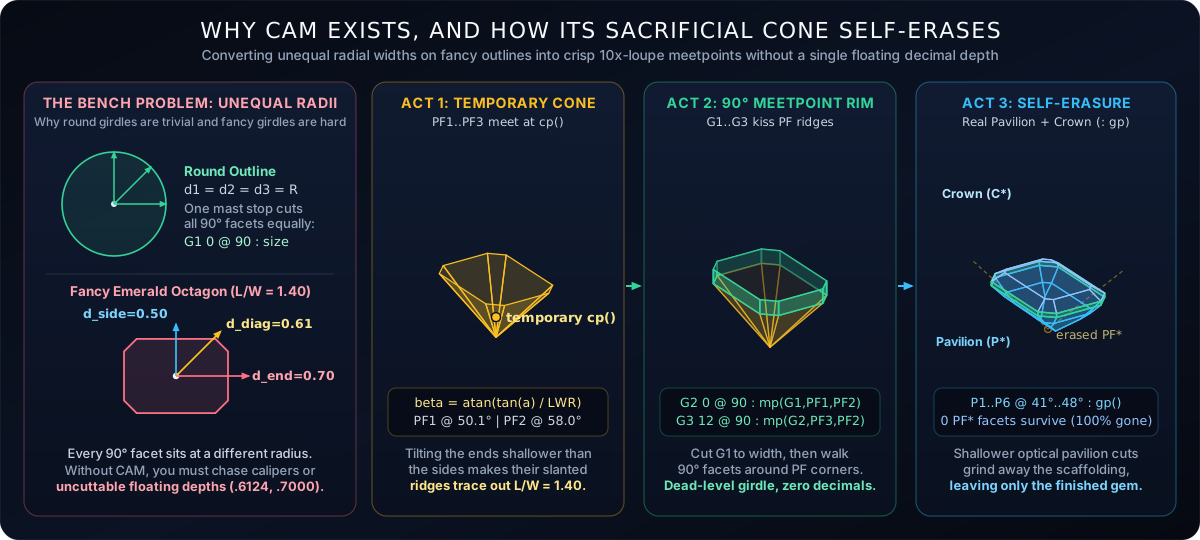
Wrapping CAM into parameterized FSL system macros solves the problem for both readers at once:
- For the human cutter: Every girdle facet after the initial width-setting cut stops at an unmistakable three-plane crystal corner visible under a 10x loupe. No digital depth gauges, no floating decimals.
- For the designer and GPU optimizer: Changing a length-to-width ratio or sweeping corner truncation automatically recalculates the temporary preform angles so the 90° girdle heals itself and stays level across every candidate stone.
No Black Boxes: Ten Lines Of Plain Fsl Inside An Emerald Macro
In closed CAD tools, outline generators are usually compiled into opaque dialog boxes that stamp out hidden coordinates behind the scenes. In ProFacet, all 44 CAM system macros are written in plain, open-box FSL using standard function syntax.
Here is the actual definition of RectTr (the truncated emerald-cut octagon macro used in Showcase designs like Crystal Glacier 961) straight from the FSL standard library:
RectTr = (lwr = 1.5, angle = 45, truncation = 0.3, offset = 0) => {
  assert(gear % 8 == 0, "Gear must be divisible by 8 for RectTr")

  // 1. Tangent-ratio law: tilt the far ends shallower so L/W = lwr at the rim
  beta         = Math.toDegrees(Math.atan(Math.tan(Math.toRadians(angle)) / lwr))
  corner_index = gear / 4

  // 2. Cut the temporary 4-sided rectangular centerpoint pyramid
  PF1 corner_index @ beta  : cp() xx2
  PF2 0            @ angle : cp()

  // 3. Establish stone width on G1, then lock G2 by pure 3-plane meetpoint
  G1 corner_index @ 90 : 0.5
  G2 0            @ 90 : mp(G1, PF1, PF2)

  // 4. Chamfer the four corners to exact proportion (1 - truncation / 2)
  tr_index = gear / 8 + offset
  PF3 tr_index      : cp() : ep(edge(PF1:corner_index, G1:corner_index), 1.0 - truncation / 2.0)
  G3  tr_index @ 90 : mp(G2, PF3, PF2)
}
Read those ten executable lines closely and every shred of mystery disappears:
- The tangent-ratio tilt law: The long sides (
PF2) are cut at the chosen preform angle at half-width from the center, while the short ends (PF1) sit farther out according to the length-to-width ratio. Tilting the far ends shallower viaatan(tan(angle) / lwr)guarantees that both planes meet at the same centerpoint apex and cross the horizontal girdle plane at the exact same height. - Angle-free corner chamfers: Notice that
PF3does not even specify a mast angle. Using point-to-point syntax, it slices a flat plane throughcp()and a proportional point along the girdle edge (ep(...)), letting the interpreter solve the exact corner mast angle automatically before locking the chamfered vertical girdle wall to the resulting meetpoint.
To watch this sacrificial scaffolding work in physical 3D crystal, we path-traced a Colombian-green emerald step cut at three snapshots of its cutting history, leaving the uncut upper rough blank frosted in Stages 1 and 2 just as it looks on a real dop before transfer:
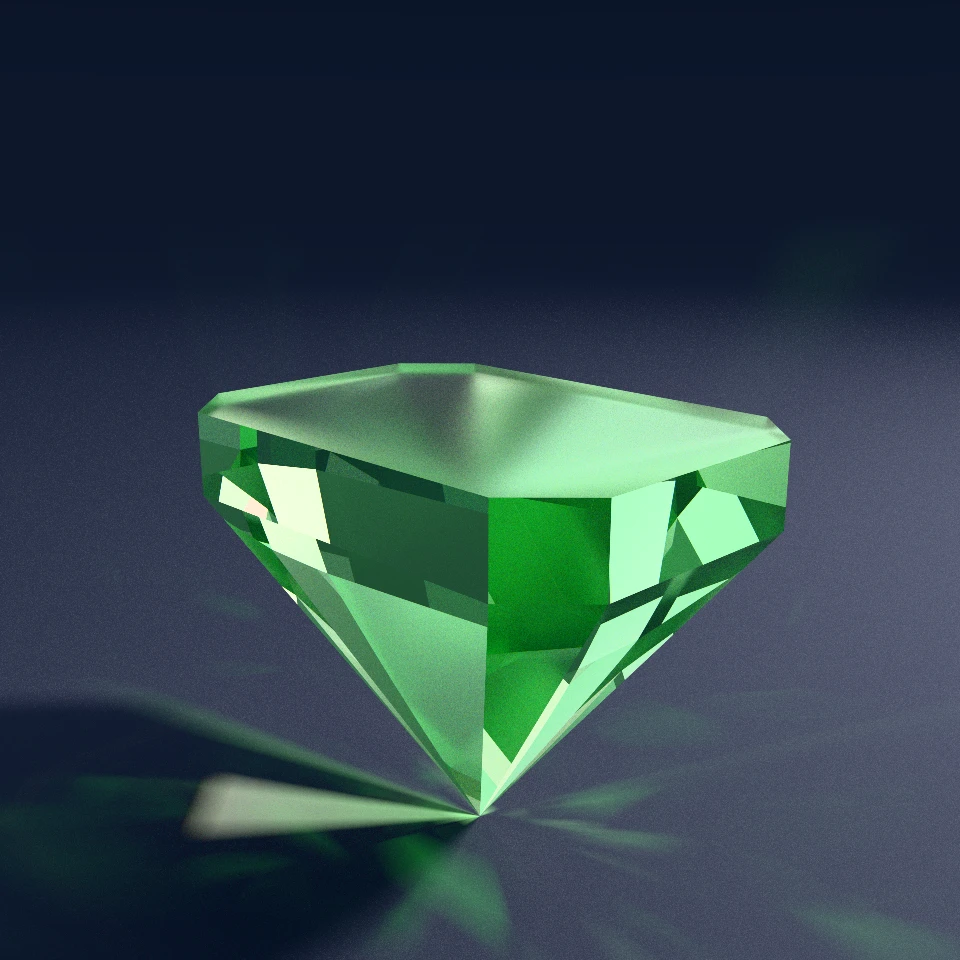
RectTr finishes: the steep 62° temporary cone meets at a sharp bottom point, locking all eight vertical emerald-octagon walls onto one level rim beneath the frosted rough top.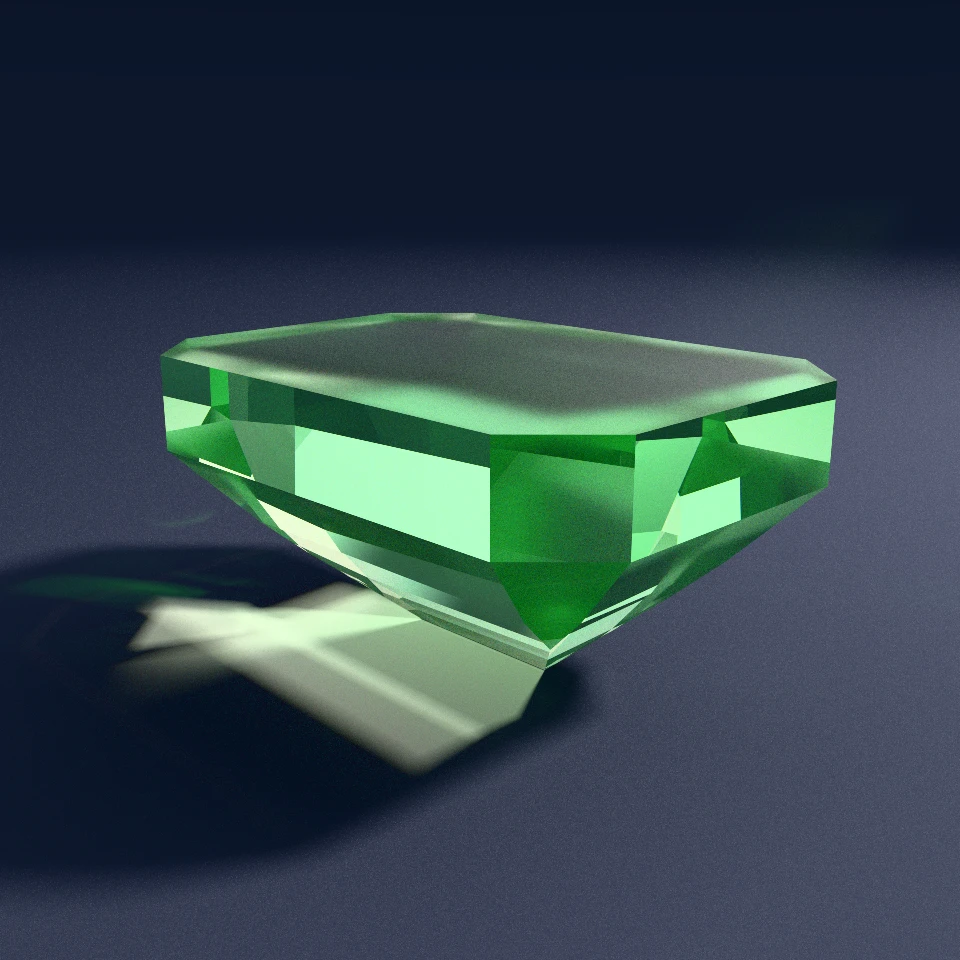
Notice a subtle geometric rule visible in Stages 1 and 2 above: when pavilion tiers cut inward from the girdle (: gp()) to erase a sacrificial cone on their own, the preform angle (such as 62°) must be steeper than the real pavilion break tiers so the temporary cone hangs deeper than the finished keel. Alternatively, as seen in Glacial Whisper 286 at the top of this article or Polished Galaxy 517, you can cut a fresh pavilion centerpoint cone first and then drop steeper girdle breaks down from the rim. Because CAM macros are ordinary half-space cuts rather than hidden metadata, the geometry engine handles both strategies naturally.
The 44-macro Matrix: Symmetries, Modifiers, And Odd Index Gears
Once you notice that corner chamfering (*Tr), mirrored split corners (*TrMir), bowed sides (*Curved), and softened cushion faces (*CushTr and *CushTrMir) are orthogonal geometric operations, you do not want a random grab-bag of ad-hoc shape scripts. You want a complete, predictable symmetry matrix across every index gear a cutter owns, including 84-tooth heptagon gears and 120-tooth pentagon gears.
We projected twelve representative preforms directly from ProFacet's standard library (system_macros.rs), plotting every sacrificial preform ridge radiating from the centerpoint inside its level 90° girdle:
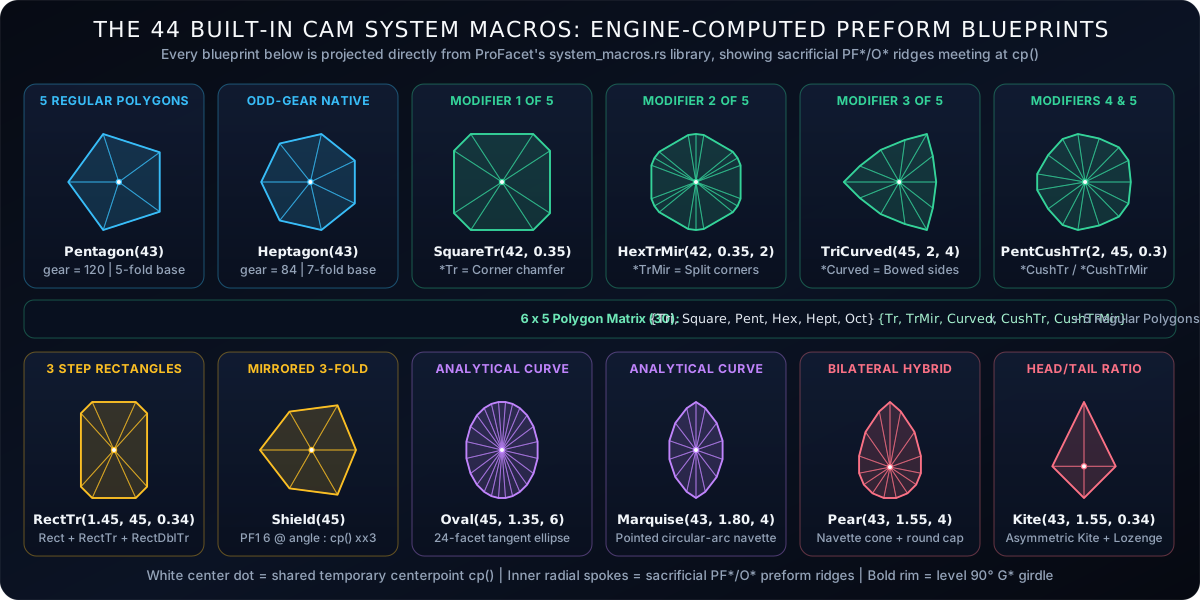
Pentagon on 120 gear, Heptagon on 84 gear) and the five orthogonal modifiers applied across three- through eight-fold symmetry. Bottom row: tangent-ratio rectangles (RectTr), three-fold Shield, analytical curves (Oval, Marquise), and bilateral points (Pear, Kite).Every built-in CAM system macro starts with an explicit assert() gear contract so an invalid gear-to-symmetry pairing fails immediately with a clear message rather than silently rounding to the wrong tooth:
| Family | Count | Built-In FSL System Macros | Gear Contract & Key Geometric Mechanism |
|---|---|---|---|
| Regular Polygons | 5 | Round, Pentagon, Hexagon, Heptagon, Octagon |
Round accepts any symmetry dividing gear; Pentagon uses 120 gear; Heptagon uses 84 gear. |
| Step Rectangles | 3 | Rect, RectTr, RectDblTr |
Gear divisible by 4 (or 8 for RectTr). Uses tangent-ratio end tilting plus single or double corner chamfers. |
| Mirrored Shield | 1 | Shield |
Gear divisible by 6. Three-fold dihedral mirror preform used in Diamond Showcase Amethyst Insignia 179. |
| Truncated | 6 | TriTr, SquareTr, PentTr, HexTr, HeptTr, OctTr |
Gear divisible by 6 through 16. Clips polygon corners proportionally via ep(). |
| Mirrored Split | 6 | TriTrMir, SquareTrMir, PentTrMir, HexTrMir, HeptTrMir, OctTrMir |
Shifts corner index with dihedral mirroring, splitting each clipped corner into paired facets. |
| Bowed Sides | 6 | TriCurved, SquareCurved, PentCurved, HexCurved, HeptCurved, OctCurved |
Pairs two index offsets bisecting the girdle edge to curve every polygon wall outward. |
| Cushioned | 6 | TriCushTr, SquareCushTr, PentCushTr, HexCushTr, HeptCushTr, OctCushTr |
Offsets primary sides to bow the flat faces outward, then clips the corners by truncation. |
| Cushioned Split | 6 | TriCushTrMir, SquareCushTrMir, PentCushTrMir, HexCushTrMir, HeptCushTrMir, OctCushTrMir |
Combines cushioned primary sides with mirrored split corner chamfers. |
| Curves & Fancies | 5 | Oval, Marquise, Pear, Lozenge, Kite |
Gear divisible by 4. Multi-segment analytical curves and asymmetric head-to-tail cones sharing one centerpoint. |
Carving Smooth Curves And Asymmetric Points On A Flat Lap
Polygons with equal radial sides are straightforward once you see how ep() clips a corner. The real mathematical fun begins when you ask a flat spinning diamond lap and a discrete 96-tooth index wheel to carve a smooth elliptical Oval, a pointed Marquise navette, a hybrid teardrop Pear, or an asymmetric Kite where the short head and long tail sit at completely different distances from the dop center.
How do you keep sixteen or twenty-four separate 90° girdle facets at different radii locked onto one horizontal plane while every preform facet still meets at a single temporary centerpoint?
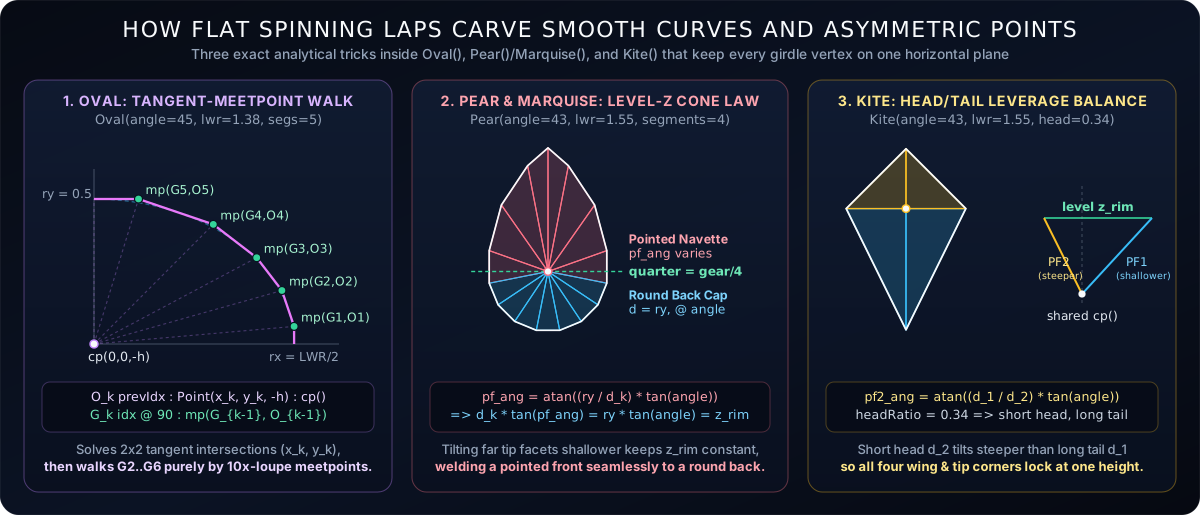
Oval solves exact intersections of adjacent discrete-gear ellipse tangents and walks girdle facets around the quadrant purely by meetpoint. Center: Pear welds a variable-angle circular-arc pointed front cone to a constant-angle semicircular back cap at the waist. Right: Kite balances a short upper head against a long lower tail so both meet at one centerpoint and lock onto level wing corners.Look at the three analytical engines inside system_macros.rs illustrated above:
- Ovals walk a chain of pure tangent meetpoints: For each segment in a quadrant,
Ovalsnaps to the nearest physical gear tooth, solves the exact corner where adjacent ellipse tangent lines intersect, and slices a preform plane through that rim corner andcp(). After setting stone width once at the waist (G1), every remaining girdle facet around the oval stops purely at a 10x-loupe meetpoint against its predecessor. - Marquises and Pears enforce the level-rim cone law: A true marquise or pear tip cannot use an ellipse because an ellipse has rounded ends rather than a crisp point. Instead,
MarquiseandPearfit a circular arc from the pointed tip to the waist and tilt each preform facet slightly steeper where the outline narrows toward the point, keeping the vertical drop from the girdle rim tocp()constant everywhere. InPear, that lets the pointed front navette cone weld seamlessly at the waist onto a semicircular back cap, all sharing one centerpoint and one level girdle. - Kites balance head-to-tail leverage: Splitting total stone length between a compact upper head and an elongated lower tail places the head facets much closer to the dop axis than the tail facets. Tilting the head preform steeper in exact inverse proportion to its shorter reach guarantees that head and tail meet at
cp()below and lock onto identical wing corners at the girdle.
Here are four fancy silhouettes spanning analytical curves, bilateral teardrops, asymmetric kites, and bowed trilliants, all compiled from those one-line CAM system macros and rendered in our spectral bidirectional path tracer:
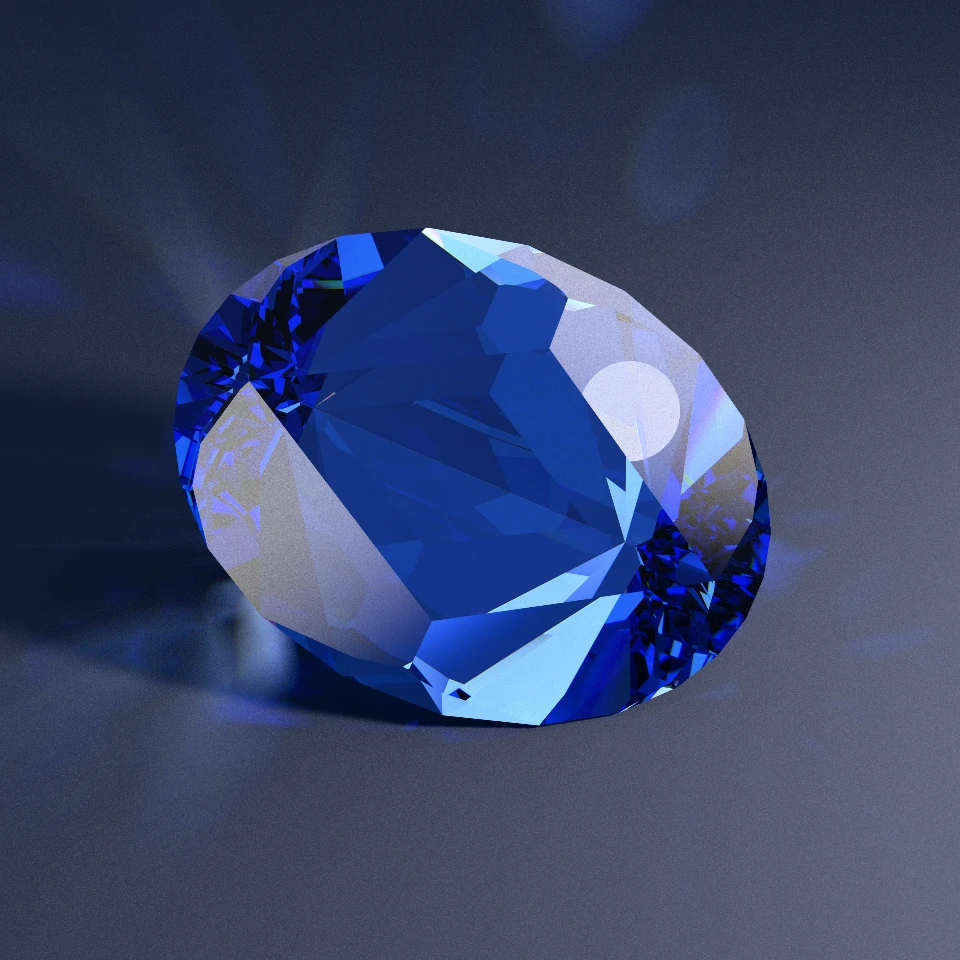
Oval, Cubic Zirconia). Twenty-four tangent-walk girdle segments wrap a crisp alternating brilliant crown with deep royal-blue light return.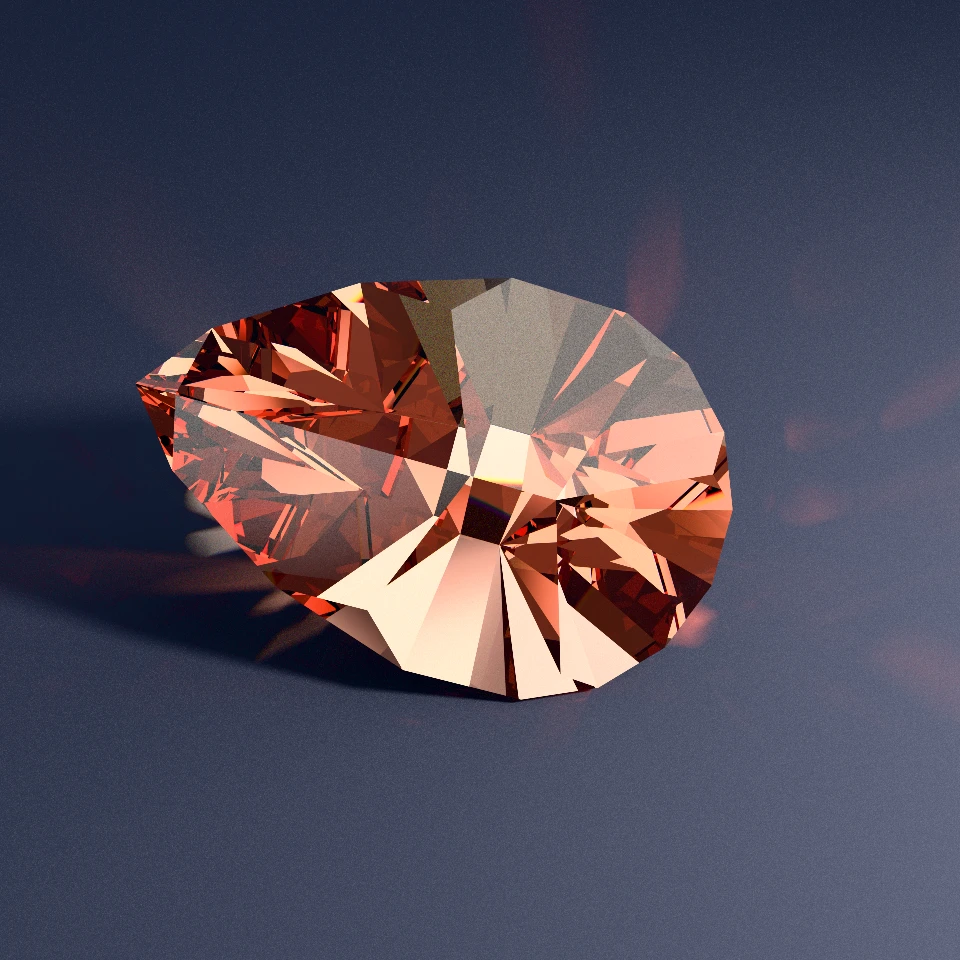
Pear, Sapphire). Pointed circular-arc front cone welded seamlessly at the waist to a semicircular back cap over a radiant culet fan.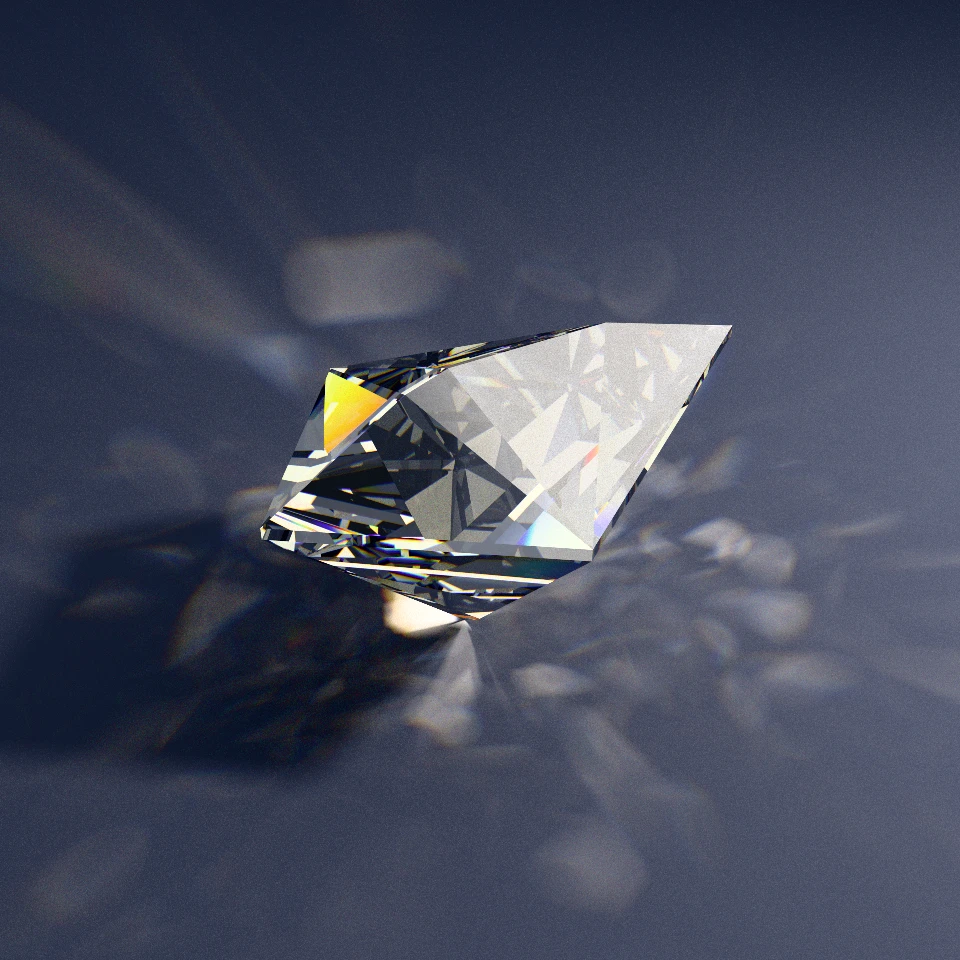
Kite, Diamond). Asymmetric head-to-tail leverage locked at a level wing girdle, throwing intense spectral dispersion fire.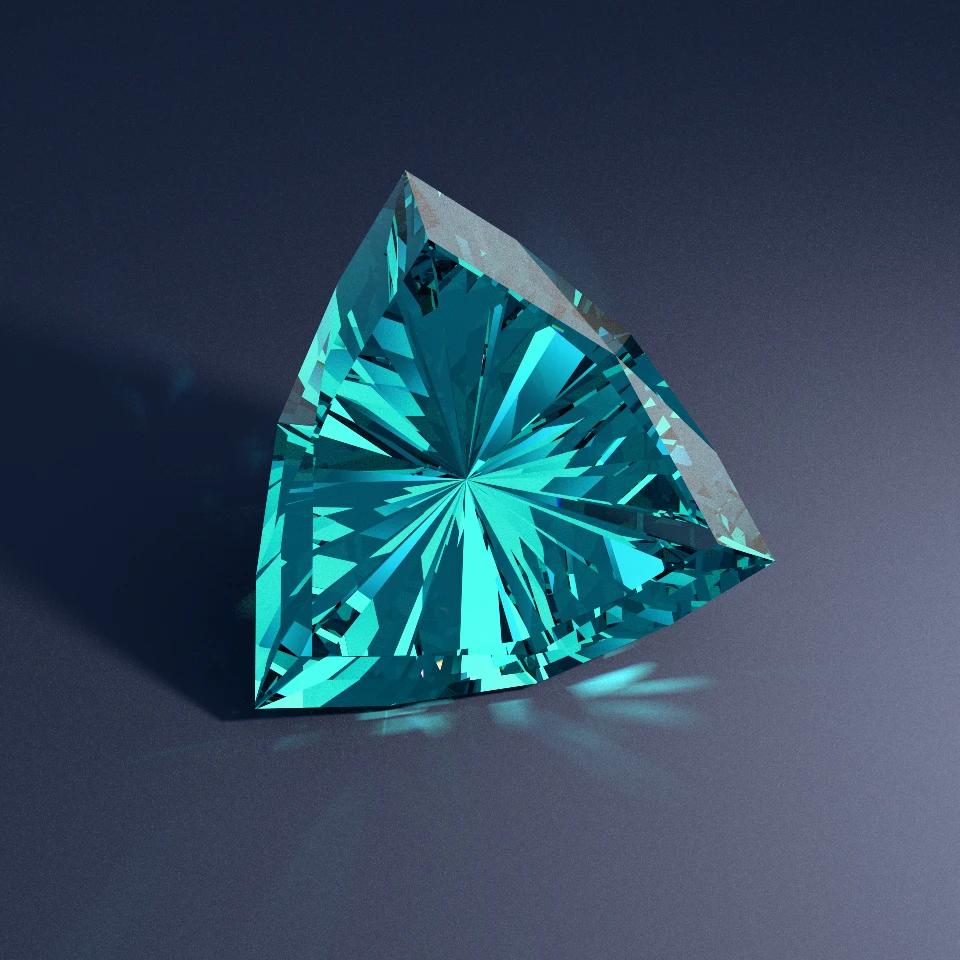
TriCurved, Sapphire). Six bowed trilliant girdle walls carved by pairing two index offsets along each side.Open Standard Library: Use All 44 Or Write Your Own In Six Lines
The best test of any language abstraction is whether users are trapped inside the authors' built-in menu or given the exact same tools to invent their own.
Because ProFacet's 44 CAM models use zero privileged engine hooks, just standard functions, trigonometry, cp(), mp(), ep(), and assert(), any cutter can define a brand-new parametric CAM outline right at the top of an .fsl file. Want a custom nine-fold nonagon cushion on a 72-tooth gear, an elongated coffin cut, or a bespoke shield ratio? Write a six-line function, call it at the top of your script, add search bounds to your optical pavilion and crown tiers, and let assert(stone().isGirdleOK) guard the entire optimization run.
Temporary scaffolding that vanishes without a trace once the arch stands up is how cathedral masons built stone vaults for centuries. On a faceting machine, a sacrificial centerpoint cone does the exact same job in miniature: it gives your 10x loupe rock-solid crystal landmarks while you lock in any silhouette you can imagine, and then kindly gets out of the light's way.
You can spin, slice, and adjust the parameters of built-in CAM preforms live in your browser using ProFacet's Interactive CAM Outline Viewer, read the full function-by-function reference in the FSL Handbook, or browse thousands of path-traced fancy shapes on OffTheDop:
Spin & Slice Built-In CAM Outlines Live in Your Browser
Adjust L/W ratios, corner truncations, cushion offsets, and head ratios live in the Interactive CAM Outline Viewer, read the complete 44-macro reference in the FSL Handbook, or browse path-traced fancy shapes on OffTheDop.